VMware KB: Unable to open a virtual machine console using the vSphere Web client in VMware vCenter Server 5.5 update 2

VMware KB: Unable to open a virtual machine console using the vSphere Web client in VMware vCenter Server 5.5 update 2.

This KB article restates an item from the vCenter 5.5 Update 2 release notes:

Virtual machines with HTML 5 console in vSphere 5.5 open connections with http:// instead of https://
When the HTML 5 console is launched on a virtual machine, it uses connections like http:// and web sockets like ws:// instead of secure connections like https:// and wss://.

This release resolves the issue by launching the virtual machine console with secure connection over port 7343 instead of the connection over port 7331.

This was a welcome change, but it introduces a potential connectivity issue for those who don’t read the release notes!

Here is a link to the release notes:  https://www.vmware.com/support/vsphere5/doc/vsphere-vcenter-server-55u2-release-notes.html#networkingissues

Here is the top level KB article for required TCP and UDP ports for vSphere products. Notice the left hand column where the version numbers are listed!
TCP and UDP Ports required to access VMware vCenter Server, VMware ESXi and ESX hosts, and other network components


VMware KB: Configuring syslog server for VMware NSX for vSphere 6.x controllers

VMware KB: Configuring syslog server for VMware NSX for vSphere 6.x controllers.

This is an interesting KB article. Please notice that the method for configuration is an API call! This is built for automation!

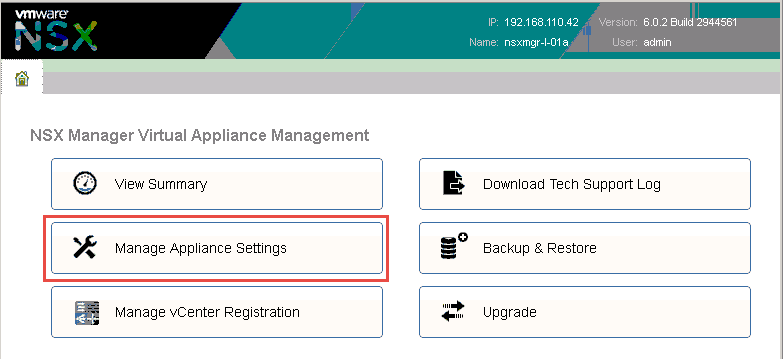
FYI, You configure the NSX Manager appliance to use a syslog server with a web browser.

NSX-manager-settings

Select “Manage Appliance Settings”

nsx-mgr-syslog-config

On the Settings > General page, click the edit button in the Syslog Server portion of the page.

NSX-Manager-syslog-dialog

Enter the DNS name or IP address of your Syslog server, then click OK.


New VCP5-DCV Delta Exam

Yesterday, I got a message from VMware Education that they are offering an online VCP5-DCV recertification exam for a limited time. For any of you who have a VCP5 that is set to expire in the spring (that is most of you!), this is a terrific way to get recertified!

Here is the information from the VMware education site: https://mylearn.vmware.com/mgrReg/plan.cfm?plan=51919&ui=www_cert

VCP5-DCV-Delta Exam

Download the exam blueprint here. After a quick review of the exam blueprint, it appears that the objectives are approximately the same, however the VCP550D exam has 65 questions with 75 minutes to complete, while the VCP550 exam has 135 questions and a time limit of 120 minutes.

Here is a link to the Pearson Vue VCP550D exam page: https://www2.pearsonvue.com/testtaker/registration/ExamSeriesDetailPage/VMWAREINC/200140.

Pearson-VCP550D

VMware Education’s Recertification Policy has other avenues for recertification for those of you who are interested in advancing to the Advanced Professional level (VCAP) or may be interested in broadening your certification with additional Professional level (VCP) certifications in Cloud, End User Computing or Network Virtualization.

Note that the offer is only good through November 30, 2014.

Shell Shocker BASH vulnerability links

A flaw in Bash, the most common Linux command shell, from 22 years ago that was discovered and incompletely patched earlier this year is reported to pose a very severe threat to systems that include it. If you use a BASH shell in Linux or other derived operating system like Android or Apple OS X (like me and I am sure many of you!) you are probably vulnerable.

According to Mitre:
vectors involving the ForceCommand feature in OpenSSH sshd, the mod_cgi and mod_cgid modules in the Apache HTTP Server, scripts executed by unspecified DHCP clients, and other situations in which setting the environment occurs across a privilege boundary from Bash execution.

Am I vulnerable?
Edit for the time being: You are. No complete public fix has been posted yet, for the new CVE (CVE-2014-7169). The instructions I give below are only sufficient to close off part of the vulnerability.
There is an easy check. Open a terminal and paste the following:
env x='() { :;}; echo vulnerable' bash -c 'echo hello'
It simply sets the environment variable called x to the value ‘() { :;}; echo vulnerable’. It then invokes bash asking it to echo back the word hello. The value of x that is set is a function definition that should do nothing. However, it is crafted to try to run ‘echo vulnerable’ at parsing of environment at bash start-up, which just prints vulnerable to standard out.

If you are not vulnerable, then the following will be shown:
bash: warning: x: ignoring function definition attempt
bash: error importing function definition for `x'
hello

If you are vulnerable, then you will see:
vulnerable
hello

Here is a link to more information from the Register: http://www.theregister.co.uk/2014/09/24/bash_shell_vuln/
Here is an article from TrendMicro that also describes the vulnerability: http://blog.trendmicro.com/trendlabs-security-intelligence/shell-attack-on-your-server-bash-bug-cve-2014-7169-and-cve-2014-6271/

Several of the vendors we have partnerships with are investigating their products to determine their vulnerability and response.

F5 has posted the security advisory: http://support.f5.com/kb/en-us/solutions/public/15000/600/sol15629.html
VMware has posted in their security and compliance blog that they are investigating: http://blogs.vmware.com/security/2014/09/vmware-investigating-bash-command-injection-vulnerability-aka-shell-shock-cve-2014-6271-cve-2014-7169.html
Red Hat has posted a very good description ion their security blog: https://securityblog.redhat.com/2014/09/24/bash-specially-crafted-environment-variables-code-injection-attack/
Another Red Hat post: https://access.redhat.com/articles/1200223

Here are links to the advisories and repositories from the US Government:

US Computer Emergency Readiness Team (US-CERT) Advisory: https://www.us-cert.gov/ncas/alerts/TA14-268A
NIST-National Vulnerability Database: http://web.nvd.nist.gov/view/vuln/detail?vulnId=CVE-2014-7169
Mitre Common Vulnerabilities and Exposures (CVE) entries: http://cve.mitre.org/cgi-bin/cvename.cgi?name=CVE-2014-7169, http://cve.mitre.org/cgi-bin/cvename.cgi?name=CVE-2014-6271

Since the patches for Bash started being released last week, three new Bash vulnerabilities have been identified: – These are new since I sent out the email last week. If systems were patched on Friday, they are probably vulnerable now unless the new patches have been applied!

US Computer Emergency Readiness Team (US-CERT) Advisory: https://www.us-cert.gov/ncas/alerts/TA14-268A

Vulnerability Note VU#252743 GNU Bash shell executes commands in exported functions in environment variables: http://www.kb.cert.org/vuls/id/252743 – This is a very good article describing affected systems

NIST-National Vulnerability Database: http://web.nvd.nist.gov/view/vuln/detail?vulnId=CVE-2014-6277, http://web.nvd.nist.gov/view/vuln/detail?vulnId=CVE-2014-7186, http://web.nvd.nist.gov/view/vuln/detail?vulnId=CVE-2014-7187

Mitre Common Vulnerabilities and Exposures (CVE) entries: http://cve.mitre.org/cgi-bin/cvename.cgi?name=CVE-2014-7169, http://cve.mitre.org/cgi-bin/cvename.cgi?name=CVE-2014-6271

Shellshocker.net https://shellshocker.net/ – Another terrific resource for understanding and testing for the 5 vulnerabilities identified so far and instructions on patching a number of operating systems.

Additional articles and advisories from vendors:

Novell/SUSE SLES 11 is affected: https://www.novell.com/support/kb/doc.php?id=7015705

Updated Knowledgebase article listing vulnerabilities in VMware products: KB 2090740  – This list is long as VMware maintains dozens of Linux based virtual appliances.

Palo Alto Networks Security Advisory: https://securityadvisories.paloaltonetworks.com/Home/Detail/24
vSphere Client 5.5 Update 2 now has the capability to edit VMs with VM hardware version 10

With the release of vSphere 5.5 Update 2 last week, the vSphere client now has the ability to edit the properties of VMs with hardware compatibility level set to version 10.

With previous versions of the vSphere Client ( aka as the “C# Client”), the following error message is displayed when you attempt to edit a VM with hardware version 10:

You cannot use the vSphere client to edit the settings of virtual machines of version 10 or higher. Use the vSphere Web Client to edit the settings of this virtual machine.

The VMware vSphere Blog article: http://blogs.vmware.com/vsphere/2014/09/using-vsphere-5-5u2-client-edit-settings-virtual-machines-version-10-higher.html describes the capabilities and includes a link with a typo for the following KB article: http://kb.vmware.com/kb/2061336.

For more information on the resolved and known issues with vCenter 5.5 Update 2, see the release notes at: https://www.vmware.com/support/vsphere5/doc/vsphere-vcenter-server-55u2-release-notes.html

Save 15% off VMware vSphere V5.5 Training and get a Free VCP Exam Voucher and a Free Gift

As a VCI, I regularly get asked about free exam vouchers or course discount deals… VMware education has a promotion running now through June 20, 2014 that includes a free VCP exam voucher, a 15% discount on a qualifying course and an additional gift.
If you have been waiting for a “deal” to afford the VCP certification, now is the time to save an get certified!

Save 15% off VMware vSphere V5.5 Training and get a
Free VCP Exam Voucher and a Free Gift

VSAN Deploy and Manage links

Here is a collection of links for resources mentioned in the VMware Virtual SAN: Deploy and Manage [V5.5] Train the Trainer class I am attending this week. Thanks to John Krueger for starting this list and sharing it with us! I plan to add to this list as we go and based on recommendations.

vSphere storage Guide – http://pubs.vmware.com/vsphere-55/topic/com.vmware.ICbase/PDF/vsphere-esxi-vcenter-server-551-storage-guide.pdf
vSphere Installation and Setup Guide – http://pubs.vmware.com/vsphere-55/topic/com.vmware.ICbase/PDF/vsphere-esxi-vcenter-server-551-installation-setup-guide.pdf

VMware Compatibility Guide for VSAN – https://www.vmware.com/resources/compatibility/search.php?deviceCategory=vsan

Virtual SAN Datasheet – http://www.vmware.com/files/pdf/products/vsan/VMware_Virtual_SAN_Datasheet.pdf
VMware® Virtual SAN™ Design and Sizing Guide – http://www.vmware.com/files/pdf/products/vsan/VSAN_Design_and_Sizing_Guide.pdf
VMware Virtual SAN Proof of Concept Guide – http://www.vmware.com/files/pdf/products/vsan/VMware_Virtual_SAN_POC_Guide.pdf
VMware Virtual SAN Quick Monitoring & Troubleshooting Reference Guide – http://www.vmware.com/files/pdf/products/vsan/VMware_Virtual_SAN_Quick_Monitoring_Reference_Guide.pdf
Virtual SAN YouTube video playlist – https://www.youtube.com/playlist?list=PL9MeVsU0uG65kM9iszj5KmNj01PiAWgvf
Virtual SAN (VSAN) Beta Webinar – How to Install, Configure & Manage: https://www.youtube.com/watch?v=cLfbeFoSQaI
How To Monitor Virtual SAN (VSAN) – https://www.youtube.com/watch?v=rHofTkK6K40

HOL-SDC-1308 – Virtual SAN (VSAN) and Virtual Storage Solutions – http://labs.hol.vmware.com/HOL/#lab/562

VMware Product Walkthrough for VSAN – http://featurewalkthrough.vmware.com/VSAN/

Cormac Hogan’s Blog – http://cormachogan.com/vsan/
Rawlinson Rivera’s Blog – http://www.punchingclouds.com/
Duncan Epping’s Blog – http://www.yellow-bricks.com/virtual-san/ – Duncan has collected a terrific compilation of blog posts related to VSAN!
Essential Virtual SAN (VSAN): Administrator’s Guide to VMware VSAN (VMware Press Technology) – pre-order for Aug. 29, 2014 release

FREE VMware e-learning course on VSAN

Around the office and with customers, I have had a lot of questions about VMware VSAN. VMware Education just released a free online e-learning class for VSAN:


VMware Virtual SAN Fundamentals [V 5.5]https://mylearn.vmware.com/mgrreg/courses.cfm?ui=www_edu&a=one&id_subject=55806


VMware Virtual SAN Fundamentals [V 5.5] is available to customers free of charge.


After completing this course, you should be able to:

* Introduce concepts related to the architecture and features of VMware virtualized storage.

* Articulate Virtual SAN benefits

* Identify the primary issues associated with Virtual SAN configuration and management

* Understand the primary use cases and customer situations when Virtual SAN is best used, including high level technical qualification criteria.

* Identify VSAN elements

* Enlist the prerequisites needed to configure Virtual SAN.


This training would be valuable for any engineers, salespeople or anyone else who wants a solid foundation for understanding VMware VSAN.

vSphere: What’s New [V4.x to V5.5] supplemental weblinks

Various weblinks from the vSphere: What’s New [V4.x toV5.5] course-

http://packetlife.net/blog/2008/oct/18/cheat-sheets-tcpdump-and-wireshark/

Click to access tcpdump.pdf

Enabling vSphere Distributed Switch health check in the vSphere Web Client
Enhanced LACP Support on a vSphere 5.5 Distributed Switch

http://en.wikipedia.org/wiki/NetFlow

http://blogs.vmware.com/vsphere/2011/08/vsphere-5-new-networking-features-netflow.html

http://v-reality.info/2012/02/setting-up-netflow-on-vsphere-distributed-switch/

http://kb.vmware.com/selfservice/microsites/search.do?language=en_US&cmd=displayKC&externalId=2032878

https://communities.intel.com/community/wired/blog/2010/09/07/sr-iov-explained

http://blog.scottlowe.org/2009/12/02/what-is-sr-iov/

http://www.youtube.com/watch?v=4l6T7bHNKeo – Flash Read Cache

Click to access VMware-vSphere-Flash-Read-Cache-FAQ.pdf

vSphere tags – http://www.youtube.com/watch?v=lQnSzP7kj7E

VDP Direct to Host restore – http://www.youtube.com/watch?v=TF7TnFncsgk

vExpert 2014!

VMware-vExpert-2014-400x57

Earlier this month, I received notification from Corey Romero and the VMware Social Media Team that I have been selected as a vExpert for 2014. I am honored to be included among the 754 vExperts that were announced here.

Congratulations to everyone who was selected, particularly my fellow ENS, Inc. employee Jason Kaplan-Coleman!

I am looking forward to being engaged within the vExpert and wider VMware community and see this as further motivation to take my participation to a higher level.